Next webinar | Ditch the Spreadsheets: Bring Everyone Together and Streamline Your Activities!

How to Create the Perfect Agenda (For Executive Assistants)
As an Executive Assistant, you are likely all too familiar with the reality of the ‘agenda chase.’ You spend days chasing busy executives to commit to topics, managing countless last-minute changes via fragmented text messages, and trying to decode vague, email threads like "Let’s talk about the Q3 update." After hours of manual formatting, you finally gather everything into a PDF or Word document, hit send, and cross your fingers that someone will open it before the meeting starts.
The problem is that the reality of an executive’s life is high pressure and fast-paced. Their priorities can pivot in the time it takes to walk from one boardroom to the next. And a static agenda simply cannot account for the dynamic nature of C-suite decision-making. If that’s 7 bullet points on a piece of paper that remains ignored until the last minute… it isn't doing its job.
To support your executive and position yourself as a strategic partner rather than just an administrator, you need to evolve your process. You need to move away from being a ‘document creator’ and toward becoming a strategic operator. This requires a shift toward a collaborative agenda. One that is accessible, interactive, and tied to business results. By moving the preparation into a shared, digital space, you ensure the team arrives ready for debate.
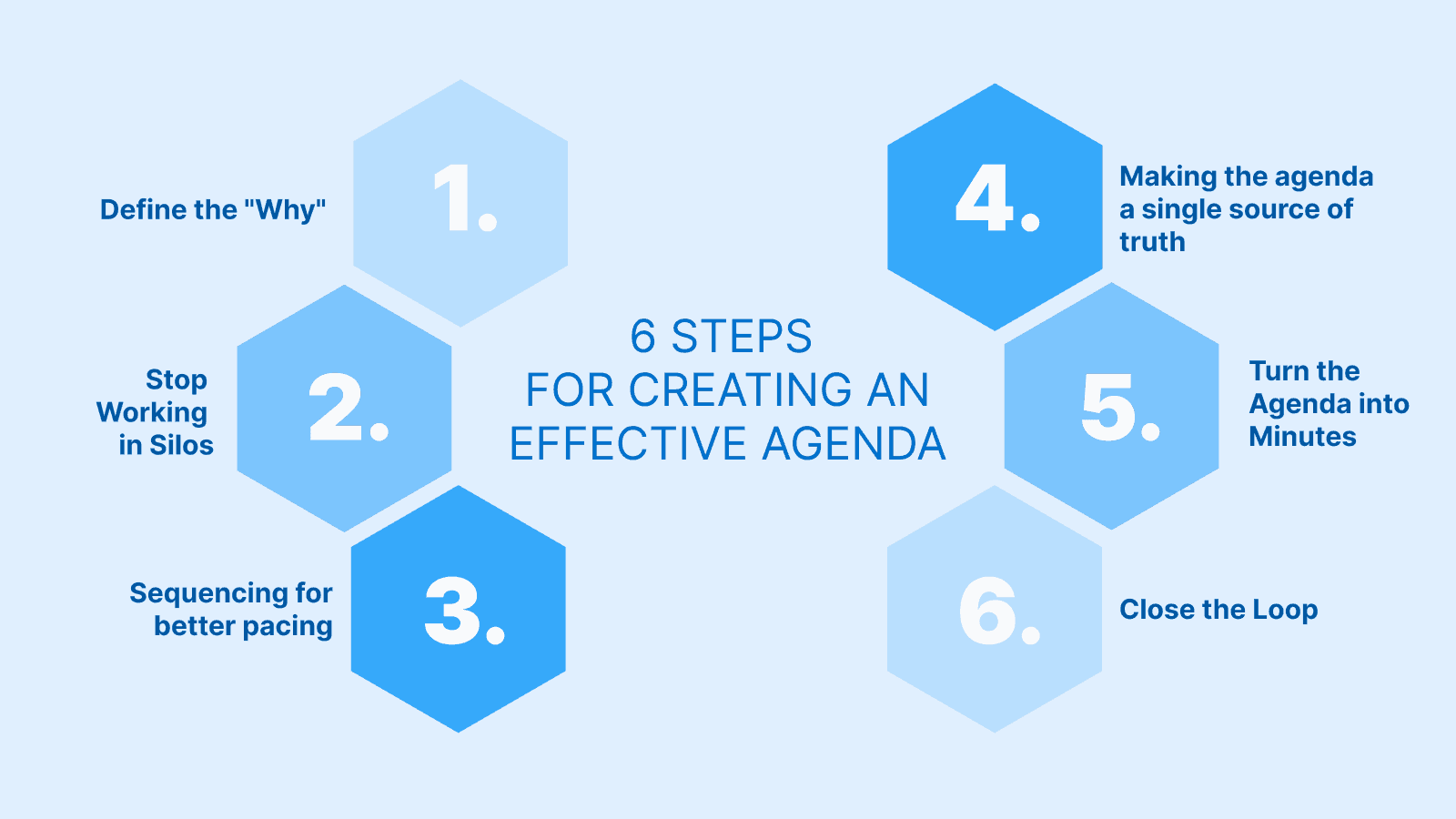
In this blog post, we’ll share six key pillars for creating the perfect, high-performing agenda that drives organizational efficiency while finally saving your sanity. Let’s dive in!
The 6 Pillars of a High-Performing Agenda
Step 1: Define the "Why"
An agenda item without a clearly defined goal or a specific purpose, is just a chat. One of the main reasons important meetings run late (or worse, result in absolutely no tangible progress) is that participants start talking before they understand why the topic was placed on the list in the first place. Without a "why," the conversation becomes useless, and the executive’s time is wasted on aimless dialogue.
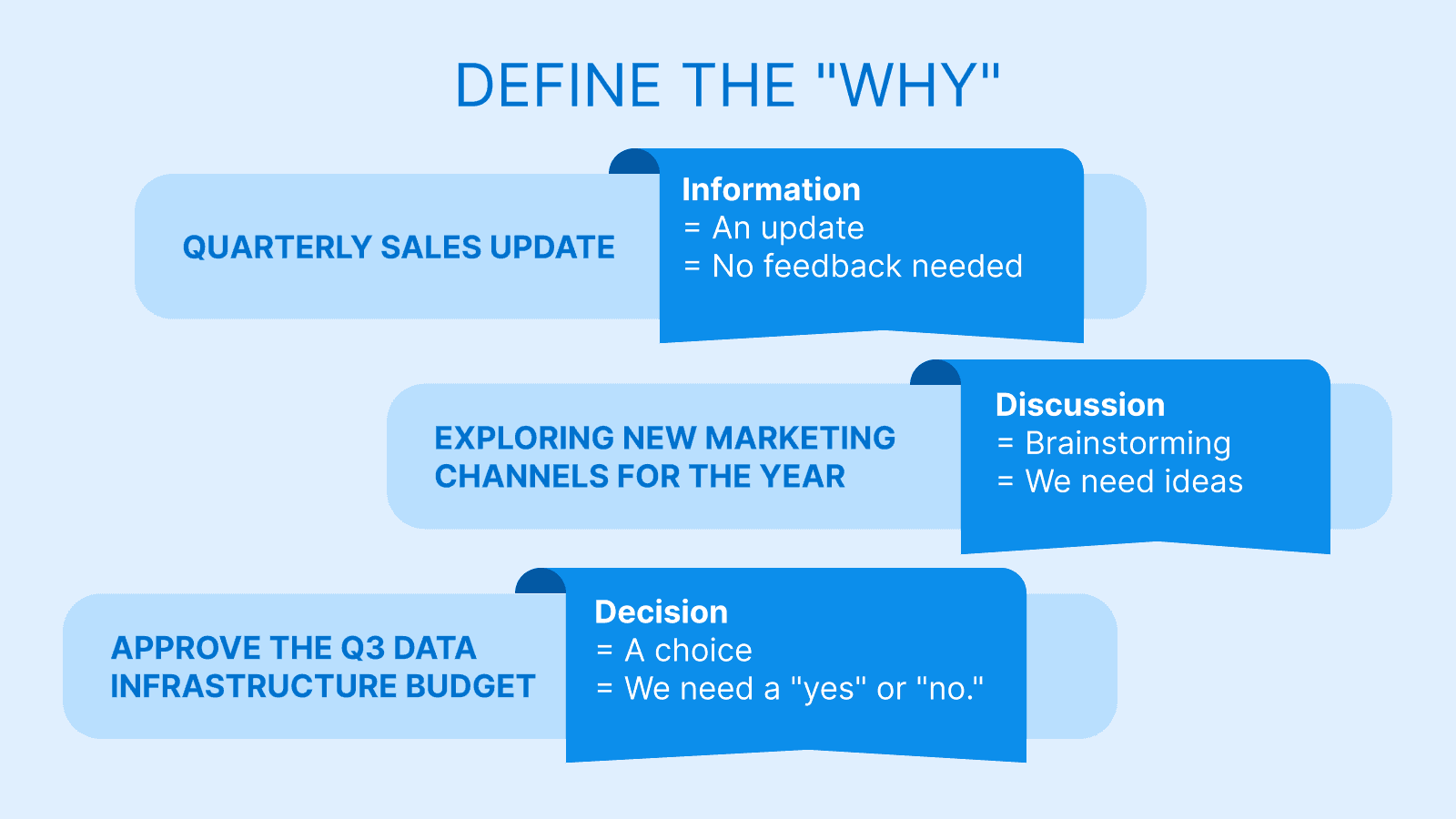
The strategy: To fix this, you need to apply a labeling strategy. What’s a labeling strategy? Well, before you add anything to the agenda, you need to label it. Every single topic fits into one of three specific buckets:
- Information: This is a one-way update. No feedback or brainstorming is required. (e.g., "Quarterly Sales Update")
- Discussion: This is for collaborative brainstorming. You need ideas, perspectives, input from the room. (e.g., "Exploring New Marketing Channels for 2026.")
- Decision: This is the most critical tag. It requires a hard "yes" or "no." (e.g., "Approve the Q3 Data Infrastructure Budget.")
Labeling matters for two main reasons. First, it shows the preparation level. If your CFO sees a topic tagged as a "Decision," they know they must study the spreadsheets and arrive with a stance. If they assume it is merely "Information," they may only skim the briefing, leading to a stall when a vote is actually called.
Second, it keeps the meeting honest. Before moving to the next topic, you – as the Executive Assistant – act as the gatekeeper by looking at the tag and asking:
- If it was a decision, did we actually decide?
- If it was a discussion, do we have clear next steps?
If the answer is "no," you do not move on until the objective is either achieved or a task is assigned to resolve it. Think of the tag as a contract, once it’s on the page, don’t break it!
Step 2: Stop Working in Silos
For too long, Executive Assistants have been treated like ’copy-paste machines,’ stuck in the middle of fragmented communication. Sounds exhausting, right? You spend your day gathering text from long email threads and manually pasting it into a Word document. This creates an unsustainable ‘silo effect’ where all the pressure falls on you to remember who wanted to discuss what, and why.
The strategy here is a shift in workflow: Stop sending those generic "What do you want to discuss?" emails. Instead, move the entire process into a shared, centralized digital agenda. Your goal is to transition from being the ‘gatherer’ to being the ‘orchestrator.’ By giving team leads and executives direct access to add their own topics, you change the psychology of the meeting in two ways:
1. Ownership: When a VP of Sales types their own topic into the agenda, they are making a public promise. They are saying, "I own this, I am responsible for the context, and I will be ready to lead the conversation." It shifts the burden of preparation from your shoulders back to the subject matter expert. 2. Management vs. administration: You stop being the person chasing others for content and start being the manager of the meeting’s flow. You are auditing the quality of the inputs.
Step 3: Sequencing for better pacing
We’ve all witnessed the ‘C-suite trap’: the first, most comfortable topic on the list eats up the first 30 minutes, leaving only five minutes for the multi-million dollar decision at the very end. The perfect agenda should be, first and foremost, a tool for time management!
The strategy is to implement strict time-boxing. Assign a number of minutes to every single item on the list. When doing this, be realistic rather than optimistic! If you know a particular topic is going to spark a debate, give it the 20 minutes it deserves rather than squeezing it into 10.
Also, you must clarify the "Who" by placing a name next to every item. This eliminates the "dead air" at the start of a topic where everyone looks around wondering who is supposed to be presenting.
Step 4: Making the agenda a single source of truth
"Did you see the attachment I sent last Tuesday? No, not that one, the v2 version." Nothing kills the momentum of a high-stakes meeting faster than the first ten minutes being spent on technical troubleshooting or file-searching. When an executive has to dig through their inbox to find a PDF, they are getting distracted by unread client emails and Slack notifications. By the time they find the document, you have already lost their mental focus.
The strategy is to put the file right next to the topic. Your agenda should be the single source of truth. Do not rely on a separate "Read Ahead" email that will inevitably get buried.
- Link it directly: If the topic is "Budget Approval," the Excel sheet should be linked right there in the agenda line item. - Curate the content: Don't just dump a folder link. Attach only the specific documents needed for that specific 15-minute slot. - Control the version: By linking the file yourself, you ensure that everyone is looking at the same version of the data. No more arguing over numbers because half the room is looking at "Q3_Report_Final" and the other half is looking at "Q3_Report_Final_V2."
This approach ensures one-click access on any device. Whether the executive is in the boardroom or joining from an iPad at an airport lounge, they have the context they need instantly. No searching, no "I can't find it," and no excuses.
Step 5: Turn the Agenda into Minutes (In Real-Time)
The traditional way of handling meeting minutes is a recipe for burnout. You write the agenda, scribble furious, shorthand notes during the session, and then spend two hours back at your desk the next morning trying to decode your handwriting and ‘clean up’ the record. This ‘double-work’ is a huge drain on your productivity.
The strategy is to let the agenda become the minutes. If you are using a centralized digital agenda, you should take your notes directly within that document while the conversation is happening. Type the summary and key points directly under each agenda topic as they are discussed.
The role of AI in note-taking: To take things a step further, there are now tools capable of generating full transcripts of your discussions using AI-powered recording. These technologies capture every detail, ensuring no information is lost and significantly reducing the pressure on Executive Assistants. All that remains is for you to summarize the content. Some AI solutions even offer automated meeting summaries, allowing you to focus on strategic validation rather than raw data entry.
By the time the meeting ends, your minutes should be 90% complete. You aren't ‘writing’ a report after the fact, you are simply polishing a record that already exists. This not only saves you hours of post-meeting labor but also allows you to distribute the finalized record to the team while the decisions are still fresh in everyone’s minds.
Step: Close the Loop
A perfect agenda is essentially useless if it doesn't result in action. The key difference between a ‘productive business meeting’ and a ‘nice chat’ is the execution that follows. Too often, meetings end with a vague sense of agreement, but no specific roadmap for who is doing what, leading to the dreaded ‘meeting about the meeting’ two weeks later.
To prevent this, you must integrate task assignmentt directly into the flow.
- Highlight decisions: Create a specific section or visual tag for "Decisions Taken." These need to stand out from general chatter so that anyone reading the minutes later can see the bottom line instantly. - Assign tasks with precision: Avoid vague notes like "Marketing to follow up." Be specific. Assign tasks with a who and a when right inside the agenda item.
When the meeting ends, everyone should walk out of the room with a clear understanding of their responsibilities. By closing the loop in real-time, you ensure that ‘decided’ becomes ‘done,’ and you won't have to spend the next week chasing people down to remind them of their own commitments.
Conclusion: Turning the Agenda into a Performance Driver
The agenda is frequently dismissed as a mere piece of administrative paperwork, but in reality, it is the backbone of effective meeting management. The invisible architecture that determines whether a session will be an engine for progress or a drain on the company’s most expensive resources.
A chaotic, vague agenda leads to a chaotic, unproductive meeting, period. On the other hand, a structured, purpose-driven agenda - one that defines the "why" and centralizes documentation - leads to clear decisions, measurable results, and organizational alignment.
By moving away from the limitations of static documents and embracing a collaborative framework, you elevate your entire professional output. You save yourself hours of redundant administrative ‘chase,’ reduce your cognitive load, and ensure your executive's time is used with precision. Stop chasing the agenda, and start letting the agenda work for you.
Try WEDO for free today and experience how a unified workspace can turn your next board meeting into a masterclass in efficiency.





Struggling to Stay Organized?
WEDO is here to help. Start your free trial now and simplify your work processes! You'll get full access to all features and add-ons for 14 days – invite your team to test it with you!